
Autel Tablets How to send DataLog from history

How to send the data log after disconnecting from the vehicle and running a function error on AUTEL tablets?

Here is the guide that helps you:

Find and enter the Data Manager

how-to-send-datalog-from-history-1


Click Data logging

how-to-send-datalog-from-history-2


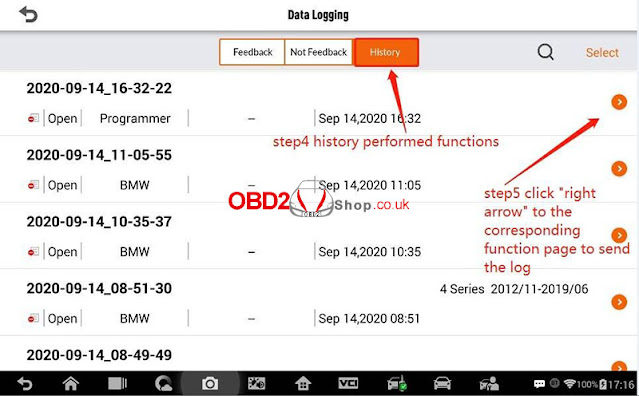
Select "History" on the "Data logging" interface

Click "right arrow" to the corresponding function page to submit the log
how-to-send-datalog-from-history-3


Fill in the reason and submit

how-to-send-datalog-from-history-4

For further technical support, please contact

https://www.obd2shop.co.uk/

Comments

Popular posts from this blog

Autel MaxiAP AP200 software download, register and update

Here is the quick reference guide about how to download, register, and update the Autel MaxiAP AP200 . Procedure: 1. Download & install APP Search for MaxiAP200 in Google Play or App Store to download and install the app to your device. Or scan the QR code to download the MaxiAP200 app. 2. Register & log in Open the AP200 app and tap Register near the top right of the screen. Follow the on-screen instructions to complete the registration. Log in with your registered email address and password. NOTE: If you have a previously created Autel ID, please use it to log in. 3. Bind VCI Tap Me > VCI Management . Scan the QR code on the AP200 Bluetooth dongle to put in the serial number. Check if the email information is correct. Tap Bind to bind VCI. 4. Purchase & install software Tap Mall or the plus sign below the Diagnose list to purchase and install vehicle-specific software. (For iOS devices, the purchased vehicle-specific...

How to update Autel MaxiSys MS908S Pro firmware & software?

The internal programming of the Autel MaxiSys Diagnostic System, known as the firmware, can be updated using the Update application. Firmware updates increase the MaxiSys applications’ capabilities, typically by adding new tests, new models, or enhanced applications to the database.  The display device automatically searches for available updates for all of the Maxisys components when it is connected to the internet. Any updates that are found can be downloaded and installed on the device.  Part 1: describes installing an update to the MaxiSys Diagnostic System firmware A notification message displays if an update is available when the Push Message function is enabled in the Settings application.  Image 1: Sample Update Screen 1. Navigation and Controls   Home Button – returns to the MaxiSys Job Menu   Update All – updates all available updates   Search Bar – search specific update item by inputting the file name, for example: a vehicle make  2. St...

Autel DS808 V.S. MP808 V.S. MK808

Autel is one of the world's leading providers of automotive intelligent diagnostic, inspection and TPMS products and services. Today let's see the similarities and differences among Autel DS808 , MP808 and MK808 diagnostic tool , which are all within a similar price range. Specifications Item Autel Maxidas DS808 Autel MaxiPRO MP808 Autel MaxiCOM MK808 Image Recommended Use Indoor Indoor Indoor Operating System Android™ 4.4.4 Android™ 4.4.4, KitKat Android™ 4.4.4 Processor Cortex-A9 processor (1.5 GHz) Cortex-A9 quad-core processor (1.4 GHz) Cortex-A9 processor(1.5 GHz) Memory          32GB 32GB 32GB Display 7-inch LCD capacitive touchscreen 7-inch LCD capacitive touchscreen 7-inch LCD capacitive touchscreen Connectivity Mini USB 2.0 USB 2.0 Wi-Fi Micr...